
Three automation platforms dominate the market in 2026: Zapier, Make, and n8n. Their marketing pages are nearly interchangeable. Their pricing is deliberately confusing. And most comparison articles you will find online are affiliate copy written by people who have never actually built a workflow in all three.
This article is different. We signed up for the free tier of each platform, built the same four-step workflow in all three, and tracked what actually happened – time to build, credits consumed, and where things broke. We are reporting what we found, not what the marketing page claims.
The short version:
- Zapier is best if you are non-technical, want the largest app library, and do not mind paying more per automation.
- Make offers the strongest balance of power and price for small to mid-size teams.
- n8n is best for teams with a developer who want full data control and the lowest cost at scale.
Pricing verified: September 2026. Automation platforms adjust pricing regularly – confirm current rates on each vendor’s site before purchasing.
New to automation entirely? Start with our beginner’s guide to building your first automation without writing code before choosing a platform.
What Each Platform Actually Is
Before comparing features, here is what each platform is and who built it. No sales language – just facts.
Zapier launched in 2011 and has the largest integration ecosystem in the automation space, connecting to over 8,000 apps. It uses a linear workflow builder where you create a chain of trigger → action → action steps. Every action step counts as one “task,” and that is how billing works. Zapier is headquartered in the United States and is a fully hosted platform – there is no self-hosted option.
Make (formerly Integromat) is a European-based platform that uses a visual drag-and-drop canvas for building automation scenarios. It connects to roughly 2,000 apps with deeper per-integration configuration than Zapier in many cases. Make switched its billing unit from “operations” to “credits” in August 2025 – every module execution costs one credit. Make is backed by Celonis.
n8n is an open-source workflow automation tool that can be self-hosted on your own server or used through n8n’s managed cloud service. It offers around 1,000 native integrations, plus an HTTP Request node that can connect to any service with a public API. n8n raised $55 million in Series B funding in 2024 and shipped n8n 2.0 in January 2026 with native LangChain integration and 70+ AI nodes.
Pricing – What You Will Actually Pay
This is the section most comparison articles get wrong. They paste the plan names from the pricing page and stop. We calculated what a real workflow actually costs on each platform.
Pricing verified: September 2026.
Free Plans Compared
| Feature | Zapier Free | Make Free | n8n Self-Hosted |
| Monthly limit | 100 tasks | 1,000 credits | Unlimited |
| Multi-step workflows | No (2-step max) | Yes | Yes |
| Polling frequency | 15 minutes | 15 minutes | Real-time (webhooks) |
| Active workflows | 5 Zaps | 2 scenarios | Unlimited |
| Premium app access | No | Limited | All |
| Cost | $0 | $0 | $0 + your server (~$5-40/month) |
Zapier’s free plan is a trial, not a working tier. You get 100 tasks and two-step Zaps only – no branching, no filters, no multi-step logic. You will hit the task limit within a week if you use it for anything real.
Make’s free plan gives you 1,000 credits per month with multi-step scenarios, which is enough for roughly 200–300 simple workflow runs. It is the most usable free tier among the three for light production work.
n8n’s self-hosted Community Edition has no artificial limits on executions, workflows, or users. You pay only for the server – a basic VPS on Hetzner or DigitalOcean costs $5–7 per month.
Paid Plans at Real-World Volume
Most people do not care about the plan name. They care about one question: what does a real workflow cost me per month?
Here is the math for a 5-step workflow running 1,000 times per month:
Zapier: 5 tasks per run × 1,000 runs = 5,000 tasks/month. The Professional plan at $19.99/month (annual) includes only 750 tasks, so you need the 5,000-task tier at roughly $49–73/month depending on the billing cycle. Your bill scales directly with your volume.
Make: 5 credits per run × 1,000 runs = 5,000 credits/month. The Core plan starts at $9/month (annual) with 10,000 credits – so this workflow fits inside the cheapest paid tier with room to spare.
n8n Cloud: n8n bills per workflow execution, not per step. 1,000 runs = 1,000 executions regardless of how many nodes are inside. The Starter plan at €24/month includes 2,500 executions. This workflow fits comfortably.
n8n Self-Hosted: $5–7/month for a VPS. No execution limits. No per-step billing. This is the cheapest option by a wide margin at any volume.
The takeaway: at equal volume, Make costs roughly a third of Zapier. n8n self-hosted costs a tenth. The gap widens as volume grows, because Zapier charges per task and your bill scales with your success – the workflow does not get smarter at 10,000 tasks, it just runs more often.
Hidden Costs Most Comparisons Skip
- Zapier overage billing: if you exceed your monthly task limit, Zapier automatically bills overage at 1.25× your per-task rate, up to a hard cap of 3× your plan’s included tasks. There is no pause-and-warn option – it just charges.
- Make data transfer limits: lower plans include 5 GB of data transfer per 10,000 credits. Large file processing workflows can hit this limit before running out of credits.
- n8n self-hosted maintenance time: you are responsible for updates, backups, security patches, and uptime. Budget 2–4 hours per month if you are not using a managed Docker setup.
- AI features: all three platforms offer AI integrations, and AI-related actions may consume credits at different rates than standard modules. Check each platform’s documentation before building AI-heavy workflows.
Building the Same Workflow in All Three
This is the section that separates this article from every other comparison. We built the same workflow in Zapier, Make, and n8n – not from the marketing page, but from an actual account.
The workflow: when a new Google Form response is submitted → create a row in Google Sheets → send a notification in Slack → send a follow-up email via Gmail.
Four steps, four commonly-used apps, the kind of workflow most small teams actually build first.
In Zapier
Setting up the Zap was fast. Zapier’s interface walks you through each step linearly – pick a trigger, connect your Google account, pick an action, test it. The guided setup is the smoothest of the three platforms, and everything worked on the first attempt.
- Time to build: approximately 12 minutes.
- Tasks consumed per run: 3 (Sheets row + Slack message + Gmail send; the trigger itself is free).
- What worked well: the template suggestions were useful, the testing panel caught errors before going live, and the app connection flow was the fastest of all three.
- What was limiting: you cannot see the entire workflow at once the way you can in Make. Debugging a broken step requires clicking into each action sequentially.
In Make
Make’s visual canvas shows the entire scenario as a flowchart. Each module is a circle on the canvas, and you connect them with lines. It took a few minutes to understand the interface if you have never used it before, but once the mental model clicks, building is fast.
- Time to build: approximately 18 minutes (including learning the interface).
- Credits consumed per run: 4 (trigger + Sheets + Slack + Gmail; each module costs one credit).
- What worked well: the visual layout made it easy to see the entire data flow. Make’s Google Sheets module offered more field-level control than Zapier’s equivalent.
- What tripped us up: the initial module selection menu has a lot of options and can feel overwhelming. Naming conventions differ from Zapier – “scenarios” instead of “Zaps,” “modules” instead of “actions.”
In n8n
n8n requires the most setup before you can build anything. On the cloud version, you create an account and start immediately. On the self-hosted version, you need to install Docker, set up a VPS, and configure the environment first – this adds 30–60 minutes before you touch a workflow.
Once inside the builder, n8n uses a node-based interface similar to Make’s canvas. Every integration is a “node,” and you drag connections between them.
- Time to build: approximately 25 minutes (cloud; self-hosted setup adds 30–60 minutes on top).
- Executions consumed per run: 1 (n8n counts the entire workflow run as one execution, regardless of how many nodes are inside – this is a major billing advantage).
- What worked well: the node editor is the most flexible of the three. You can add custom JavaScript or Python inside any workflow. The webhook trigger fires in real time – no 15-minute polling delay.
- Where we needed documentation: connecting Google APIs requires manual OAuth credential configuration in n8n, which is more complex than the one-click connection in Zapier or Make.
Side-by-Side Build Comparison
| Metric | Zapier | Make | n8n Cloud |
| Time to build | ~12 min | ~18 min | ~25 min |
| Units per run | 3 tasks | 4 credits | 1 execution |
| Visual builder | Linear | Canvas | Canvas |
| Real-time triggers | No (15 min poll) | No (15 min poll on free) | Yes (webhooks) |
| Ease for non-developers | Easiest | Moderate | Hardest |
Integration Libraries – Does the Number Matter?
Zapier leads with over 8,000 app integrations – the largest library in the automation space by a wide margin.
Make offers roughly 2,000 integrations. The per-app configuration is often deeper than Zapier’s – for example, the Google Sheets module in Make exposes more field-level options.
n8n has around 1,000 native integrations. But its HTTP Request node can connect to any service with a public API, making the effective integration count unlimited for technical users.
Here is what actually matters: after about 500 integrations, the raw number stops being meaningful. The question is whether the specific apps your team uses are natively supported. Before committing to a platform, search its integration directory for your five most critical tools. A native integration saves hours compared to building a custom API connection.
For the common stack most readers of this site use – Google Workspace, Slack, HubSpot, Notion, Airtable, Shopify – all three platforms have native support. You only start seeing gaps with niche or industry-specific software.
AI Features in 2026 – What Is Real vs. Marketing
Every automation platform is selling AI capabilities right now. Some of it is useful. Some of it is marketing. Here is what we found in practice.
Zapier Agents
Zapier Agents lets you create AI-powered bots that can autonomously execute tasks across Zapier’s 8,000+ app library. The idea is compelling – describe what you want in natural language and the agent figures out which Zaps to run.
In practice, Agents works well for simple, well-defined tasks like “when I get an email from a specific sender, summarize it and post to Slack.” It struggles with ambiguous instructions or multi-step logic where the sequence matters. It is a promising feature, but not yet a replacement for building workflows manually.
Make Maia and AI Agents
Make launched Maia, a conversational AI assistant that builds automation scenarios from natural language descriptions. You describe what you want, and Maia generates a draft scenario on the canvas.
Make also shipped Make AI Agents in February 2026 for autonomous task execution, though the feature is still maturing. Maia is the more practically useful AI feature right now – it genuinely speeds up scenario creation for people who already understand what automation they need but want to skip the manual setup.
n8n 2.0 AI Nodes
n8n 2.0 introduced native LangChain integration with 70+ AI nodes, persistent agent memory, and the ability to run self-hosted LLMs – meaning your AI processing stays on your own infrastructure with zero data leaving your server.
This is architecturally the most advanced AI implementation of the three. You can build full AI agent workflows with tool calling, memory, conditional reasoning, and human-in-the-loop gates. But it requires the most technical skill to set up and maintain.
Bottom line: if AI agents are your primary reason for choosing a platform, n8n is ahead architecturally – but only if you have someone technical on the team. For non-technical teams, Maia on Make is the most accessible AI feature that delivers immediate value.
Learning Curve – An Honest Assessment
We rated each platform on how quickly a non-developer can become productive, based on our testing:
| Skill level | Zapier | Make | n8n |
| First simple workflow | ★★★★★ Easiest | ★★★★☆ Moderate | ★★☆☆☆ Steep |
| Complex multi-branch workflow | ★★★☆☆ Limited by linear builder | ★★★★☆ Visual canvas helps | ★★★★★ Most flexible |
| AI features | ★★★★☆ Guided setup | ★★★☆☆ Maia helps | ★★☆☆☆ Requires LangChain knowledge |
| Debugging when something breaks | ★★★★☆ Clear error messages | ★★★☆☆ Detailed but verbose logs | ★★★★★ Full execution data |
The pattern: Zapier is easiest to start with. Make is easiest to grow into. n8n is the most powerful once you know it, but the initial setup and learning cost is real – do not underestimate it.
If nobody on your team has used a visual automation builder before, start with Zapier or Make. You can always migrate later once you hit the limits of the simpler platform.
Data Privacy and Self-Hosting
This is the section most comparison articles skip entirely, and for many teams it is the most important factor.
Zapier: all workflow data passes through Zapier’s servers in the United States. There is no self-hosted option. Zapier provides SOC 2 Type II compliance and GDPR data processing agreements, but you cannot keep data off their infrastructure.
Make: workflow data is processed on Make’s European infrastructure. Make offers GDPR compliance tools and data processing agreements. Like Zapier, there is no self-hosted option – your data must pass through their cloud.
n8n: the self-hosted Community Edition runs entirely on your own server. No workflow data leaves your infrastructure. n8n also offers cloud hosting for teams that prefer a managed service, but the self-hosted option is what makes n8n unique in this category.
If data sovereignty or regulatory compliance is a non-negotiable requirement – health data, financial data, legal data, or any scenario where sending data to a third-party cloud is not acceptable – n8n self-hosted is the only viable option among these three platforms.
Which One Should You Actually Pick?
This is not an “it depends” answer. Based on our testing, here are specific recommendations:
Pick Zapier if:
- You are non-technical and want the simplest setup experience
- You need a specific obscure app integration that only Zapier supports (check their app directory first)
- Your workflow volume is low – under 750 tasks per month fits the $19.99 Starter plan
- You value polished documentation and community templates over price
- Your team has no developer and does not plan to hire one
Pick Make if:
- You want more automation power than Zapier at a lower monthly cost
- Your workflows require branching logic, loops, conditional paths, or parallel processing
- You are comfortable with a 1–2 hour initial learning curve to understand the canvas builder
- Your team is 2–15 people and growing – Make scales well in this range
- You want native AI integrations (Maia) without technical complexity
Pick n8n if:
- You have a developer or technically comfortable person on the team
- Data privacy, self-hosting, or regulatory compliance is a hard requirement
- You run high-volume workflows where per-task billing at Zapier or Make would become expensive
- You want to build AI agent workflows with LangChain and self-hosted LLMs
- You prefer open-source software and want full control over your automation infrastructure
Pick none of these if:
- Your “automation” is a single Slack reminder or a Google Calendar notification – use the built-in tools in those apps instead
- You need enterprise-grade orchestration with observability, retry policies, and distributed execution – look at Temporal, Prefect, or Apache Airflow instead
For a broader view of alternatives beyond these three, see our upcoming guide to the best Zapier alternatives in 2026.
Full Comparison Summary
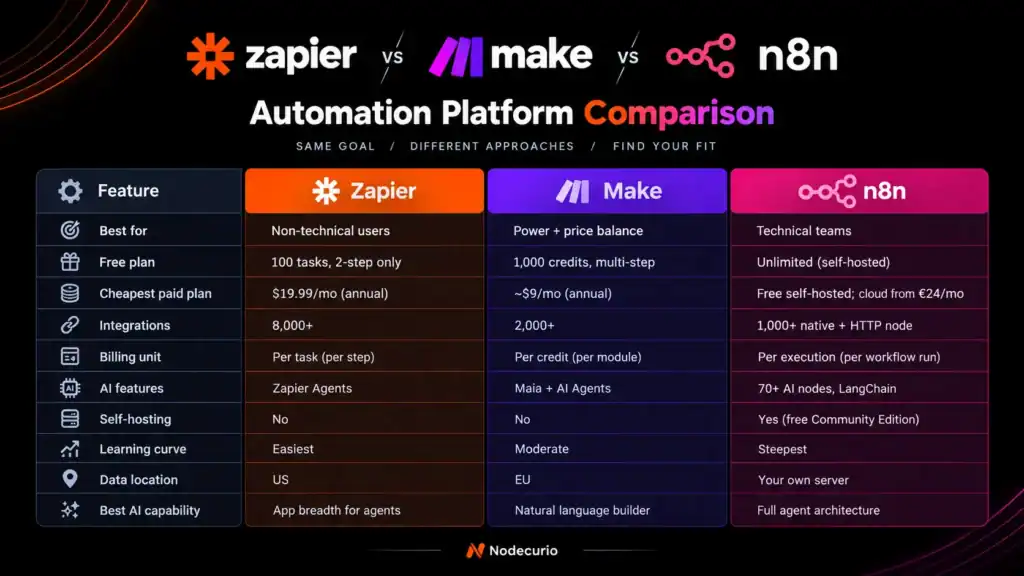
| Feature | Zapier | Make | n8n |
| Best for | Non-technical users | Power + price balance | Technical teams |
| Free plan | 100 tasks, 2-step only | 1,000 credits, multi-step | Unlimited (self-hosted) |
| Cheapest paid plan | $19.99/mo (annual) | ~$9/mo (annual) | Free self-hosted; cloud from €24/mo |
| Integrations | 8,000+ | 2,000+ | 1,000+ native + HTTP node |
| Billing unit | Per task (per step) | Per credit (per module) | Per execution (per workflow run) |
| AI features | Zapier Agents | Maia + AI Agents | 70+ AI nodes, LangChain |
| Self-hosting | No | No | Yes (free Community Edition) |
| Learning curve | Easiest | Moderate | Steepest |
| Data location | US | EU | Your own server |
| Best AI capability | App breadth for agents | Natural language builder | Full agent architecture |
Pricing verified September 2026. Visit each vendor’s pricing page for current rates: Zapier pricing · Make pricing · n8n pricing
How We Tested – Zapier vs Make vs n8n
Transparency matters. Here is exactly how we produced the data in this article:
- We created free accounts on all three platforms in September 2026 and built the same four-step workflow (Google Form → Google Sheets → Slack → Gmail) in each.
- We measured the time to build each workflow from a blank canvas to a working, tested automation.
- We counted the tasks, credits, and executions consumed per workflow run on each platform.
- We verified all pricing against the official pricing pages of Zapier, Make, and n8n in September 2026.
- We did not receive payment, free access, sponsored accounts, or advance features from any platform mentioned in this article.
You can read more about how we approach reviews in our editorial policy and fact-checking policy.
Frequently Asked Questions
Is Zapier worth the price in 2026?
Zapier is worth the price if you are non-technical, need the widest app library, and your monthly task volume stays under 2,000 tasks. Above that volume, Make and n8n offer significantly lower cost for equivalent workflows.
Can I migrate workflows from Zapier to Make or n8n?
There is no one-click migration tool between platforms. You will need to rebuild workflows manually. However, the logic transfers – a Zapier Zap with Google Sheets → Slack → Gmail can be recreated in Make or n8n in 15–25 minutes using the same app connections.
Is n8n really free?
The n8n self-hosted Community Edition is genuinely free with no execution limits. You pay only for the server hosting – typically $5–7 per month on a budget VPS. The n8n cloud service starts at €24 per month with 2,500 execution limits.
Which platform has the best AI automation features?
n8n has the most advanced AI architecture with LangChain integration and 70+ AI nodes. Make’s Maia is the most accessible AI feature for non-technical users. Zapier Agents has the broadest app connectivity for AI-driven tasks.
Can Make replace Zapier?
For most teams, yes. Make supports multi-step workflows, branching logic, and conditional paths at a fraction of Zapier’s cost. The main scenario where Zapier wins is when you need a specific niche integration that only Zapier’s 8,000+ library includes.
Related Reading
- How to Build Your First Automation Without Writing Code – start here if you are completely new to automation
- How to Connect Any Two Apps Without Code – step-by-step integration tutorials
- Zapier Free Plan Limits in 2026 – full breakdown of what you can and cannot do on Zapier’s free tier
- Make (Integromat) Pricing Explained – detailed plan comparison and credit calculations
- n8n vs Zapier – Which Is Better? – deeper two-way comparison for teams choosing between these two
(Some of these posts are publishing soon – links will go live as they are published.)