
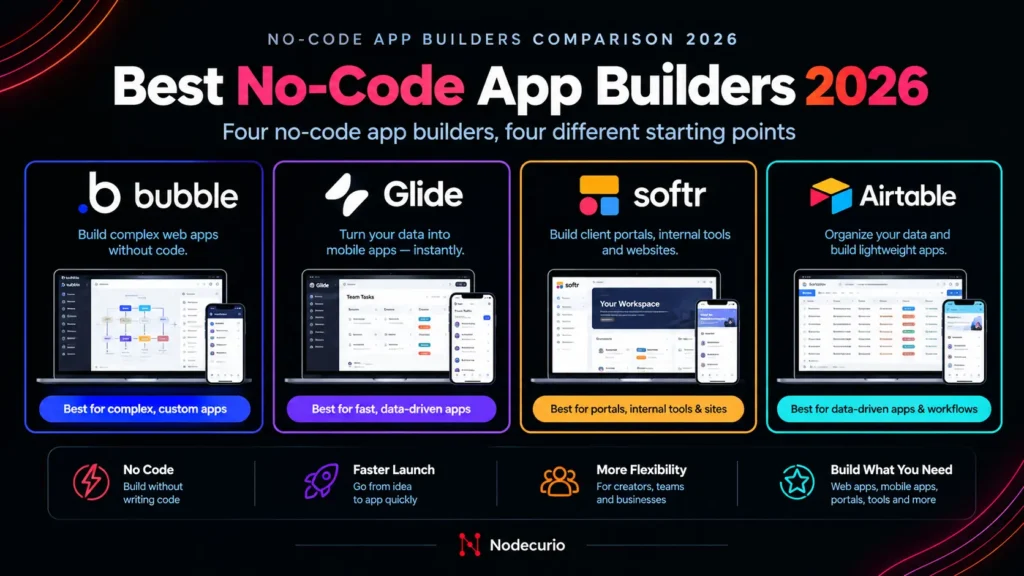
Short answer: the best no-code app builders depends on what you are building, not on which tool has the longest feature list. In 2026, the four worth a non-developer’s time are:
- Bubble – best for building a real product (a SaaS app, marketplace or customer-facing web app) with your own logic and database. Most powerful, steepest learning curve. From $29/month.
- Glide – best for turning a spreadsheet into a polished mobile-friendly app for your team, fast. From $19/month.
- Softr – best for client portals and internal tools where many people log in but only a few build. From $19/month.
- Airtable Interfaces – best if your team already runs on Airtable and needs a simple app layer on top of it. From $20 per editor per month.
The mistake most people make is picking the tool first and the project second. A tool that is perfect for an internal inventory tracker can be the wrong choice for a client portal with 200 users – and the difference usually shows up on the invoice, not in the demo.
Pricing verified: September 2026. Annual billing unless stated. See the methodology note at the end.
What “no-code app builder” actually means in 2026
A no-code app builder lets you create working software – with screens, a database, user logins and logic – using visual editors instead of writing code. The four tools in this guide all do that, but they start from very different places:
- Bubble starts from a blank canvas and a database you design yourself. You build everything: pages, data structure, workflows.
- Glide starts from your data – a Google Sheet or Glide’s own tables – and generates an app you then customise.
- Softr starts from pre-built blocks (lists, forms, dashboards, login pages) that you connect to a data source.
- Airtable Interfaces starts from an Airtable base and adds app-style screens on top of data you already have.
That starting point decides two things: how fast you get a first version, and how far you can go before you hit a wall. The tools that are fastest to start are also the ones with the lowest ceiling.
Quick comparison: Bubble vs Glide vs Softr vs Airtable
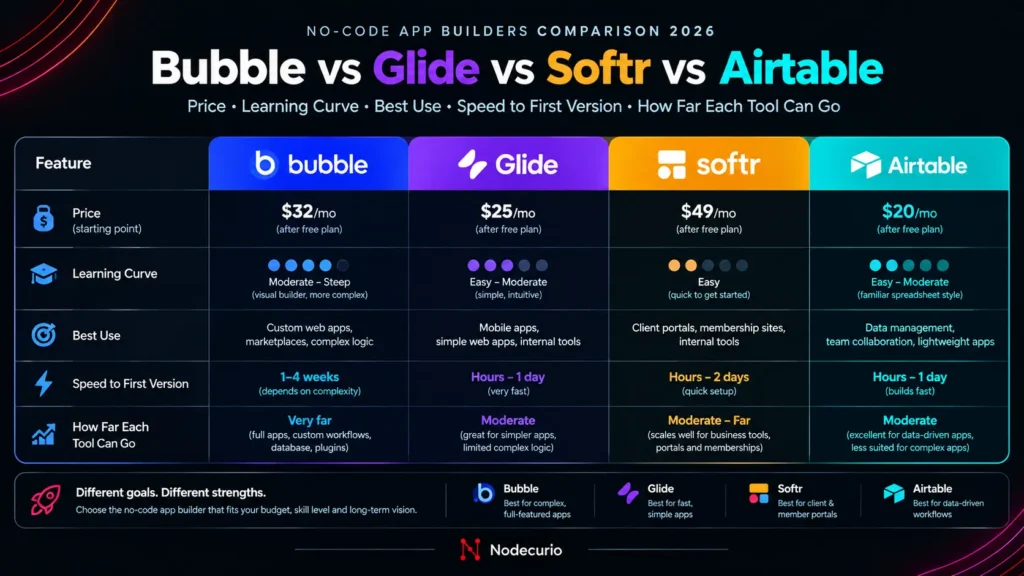
| Bubble | Glide | Softr | Airtable Interfaces | |
| Best for | SaaS products, marketplaces, custom web apps | Spreadsheet-based team apps | Client portals, internal tools | App layer for existing Airtable data |
| Cheapest paid plan | $29/mo (Starter) | $19/mo (Explorer) | $19/mo (Basic) | $20 per editor/mo (Team) |
| What you pay for as you grow | Workload units (server usage) | Users and data updates | App users and builders | Editor seats and records |
| Learning curve | Steep (weeks) | Easy (hours) | Easy (hours) | Easy if you know Airtable |
| Native mobile app | Yes, on mobile plans | No (web app / PWA) | No (web app) | No (Airtable’s own apps) |
| Custom logic | Extensive | Moderate | Moderate | Basic, via automations |
| Ceiling | Highest | Medium | Medium | Lowest |
Bubble: the most powerful no-code app builder
What you can realistically build: almost any web application a small startup would need – a SaaS product with user accounts and subscriptions, a two-sided marketplace, a booking platform, a customer dashboard. Bubble gives you a visual page editor, a database you design yourself, and a workflow engine for logic (“when this button is clicked, create this record, charge this card, send this email”). It can also publish native mobile apps to the App Store and Google Play on its mobile and web-plus-mobile plans.
Where the ceiling is: Bubble’s ceiling is less about features and more about skill and cost. Building a well-structured Bubble app takes weeks of learning, and a poorly built one gets slow and expensive as users grow. Your code also stays on Bubble – there is no export to a standard codebase, so moving off Bubble later means rebuilding.
How the pricing works: Bubble charges a plan fee plus workload units (WU) – a meter for the server work your app does on every page load, database search, workflow and API call.
| Plan (web) | Price (annual) | Included workload | Notes |
| Free | $0 | 50K WU | Build and test only – cannot go live on a custom domain |
| Starter | $29/mo ($32 monthly) | 175K WU | Live app, custom domain |
| Growth | $119/mo | 250K WU | 2 editors, premium version control, 2FA |
| Team | $349/mo | 500K WU | More editors and branches |
| Enterprise | Custom quote | ||
Mobile-only and web-plus-mobile plans cost more than the web-only prices above. If you use more workload than your plan includes, you can buy a workload tier or pay overage – reported at around $0.30 per 1,000 WU. Bubble emails you at 75% and 100% of your allowance.
Pick Bubble if you are building a product other people will pay for, you need custom logic and your own database, and you are prepared to invest real learning time.
Glide: the fastest way to turn a spreadsheet into an app
What you can realistically build: team apps built around data – an inventory tracker, field-service checklist, staff directory, sales lead list, event check-in app or simple CRM. Connect a Google Sheet (or use Glide’s own tables), and Glide generates a clean, mobile-friendly app you can customise in an afternoon. Glide also includes AI features and workflows for light automation.
Where the ceiling is: Glide is excellent inside its lane and frustrating outside it. Complex multi-step logic, heavy custom design and large public user bases push against its limits. Glide apps run as web apps you can install on a phone’s home screen, not as native App Store apps.
How the pricing works: Glide meters published apps, users and “updates” – an update is used whenever app data changes or syncs with an external source like Google Sheets.
| Plan | Price (annual) | Monthly | Key limits |
| Free | $0 | $0 | Draft apps for learning and prototyping |
| Explorer | $19/mo | $25/mo | 1 published app, up to 100 personal users, 250 updates/month |
| Maker | $49/mo | $60/mo | 3 published apps, 2 editors, unlimited personal users, 500 updates/month, custom domain and branding |
| Business | $199/mo | $249/mo | Unlimited apps, 10 editors, 30 business-email users included (+$5/user/month), 5,000 updates/month |
| Enterprise | Custom quote – includes SQL and other advanced data sources | ||
Extra updates cost $0.02 each on paid plans. One detail catches many teams: Maker’s “unlimited users” covers people signing in with personal or education email addresses. If your team uses company email addresses, you need Business.
Pick Glide if your data already lives in a spreadsheet, the app is for your own team, and you want something useful this week rather than this quarter.
Softr: best for client portals and internal tools
What you can realistically build: client portals (customers log in to see their orders, documents or project status), partner directories, internal dashboards, knowledge bases and simple CRMs. Softr gives you ready-made blocks – lists, tables, forms, charts, login pages – plus user groups and permissions, so different people see different data. It now includes its own database, and it also connects to Airtable, Google Sheets and other sources.
Where the ceiling is: Softr is built from blocks, so you work within what the blocks can do. Highly custom interfaces or complex app logic are harder than in Bubble. Heavy automation needs an outside tool like Zapier, Make or n8n – see our Zapier vs Make vs n8n comparison – and Softr’s own workflows pause if you hit your monthly execution limit.
How the pricing works: Softr charges by app users and builders, not by number of apps – apps are unlimited on every plan. It splits users into team users (people on your company’s email domain) and client users (everyone else).
| Plan | Price (annual) | Monthly | Builders | Team users | Client users |
| Free | $0 | $0 | Up to 3 | 5 total | |
| Basic | $19/mo | $25/mo | 1 | 5 | 5 |
| Pro | $99/mo | $119/mo | 2 | 10 (+$3 each, max 50) | 50 (+$1 each, max 250) |
| Business | $329/mo | $395/mo | 3 | 30 (+$5 each, max 100) | 100 (+$2 each, max 500) |
| Enterprise | Custom quote – SSO, audit logs, Snowflake and BigQuery | ||||
Every paid plan includes one custom domain; extra domains cost $13/month on annual billing. Softr also offers a 50% discount for non-profits and education.
Pick Softr if you need people outside your team – clients, partners, members – to log in and see their own data, and you want it live in days.
Airtable Interfaces: an app layer for teams already on Airtable
What you can realistically build: internal dashboards, approval screens, content calendars, project trackers and data-entry forms on top of an Airtable base. Interface Designer is included on every Airtable plan, so if your team already runs on Airtable, you can build a simple app without adding another tool.
Where the ceiling is: Airtable Interfaces is the most limited of the four as an app builder. It is designed for your own team, not for customers. Letting external people in requires the paid Portals add-on, which starts at around $120/month for 15 guests on the Team plan. Branding and design control are limited compared to Softr or Bubble.
How the pricing works: Airtable charges per editor – anyone who can change data. Read-only viewers are free on every plan.
| Plan | Price (annual) | Monthly | Records per base | Notes |
| Free | $0 | $0 | 1,000 | Up to 5 editors, 100 automation runs/month |
| Team | $20 per editor/mo | $24 per editor/mo | 50,000 | 25,000 automation runs/month |
| Business | $45 per editor/mo | $54 per editor/mo | 125,000 | Admin controls, more automation |
| Enterprise Scale | Custom quote | |||
One thing to watch: Bending Spoons – the company behind Evernote and WeTransfer – agreed to buy Airtable in August 2026. Prices have not changed, but Bending Spoons has raised prices at products it acquired before, so it is worth budgeting with some headroom.
Pick Airtable Interfaces if your data and your team already live in Airtable and the “app” is mainly for internal use.
What each builder costs at real team sizes
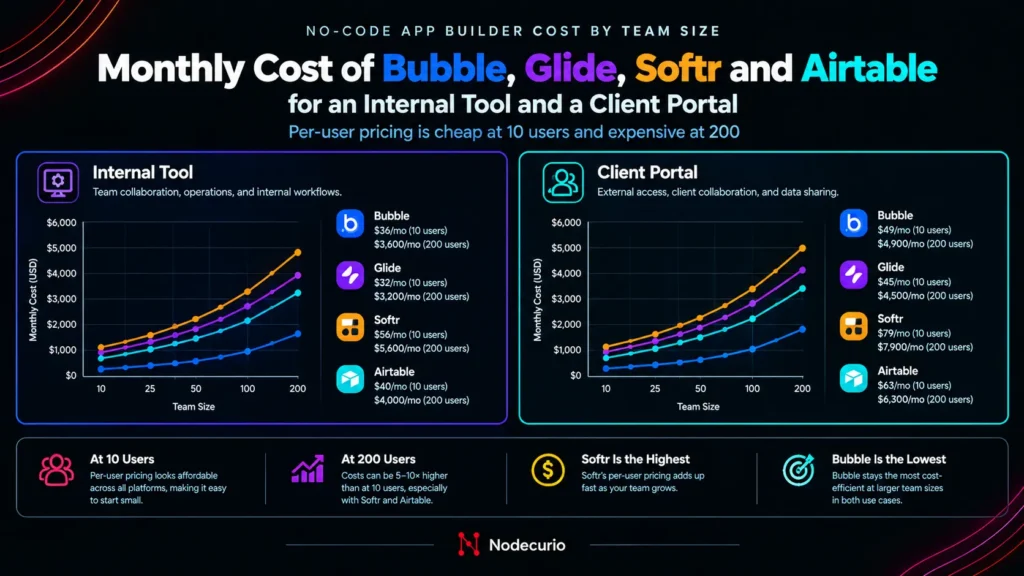
List prices are misleading because each tool meters something different. Here is what three common projects would cost on each, at annual pricing. These are calculations from published prices, not quotes. If your app also relies on an automation tool, add that cost too – here is what automation actually costs per run.
Scenario 1: internal tool for 10 staff on company email
- Bubble: Starter at $29/month – Bubble doesn’t charge per user – plus any workload overage.
- Glide: Business at $199/month (company email users need Business; 30 are included).
- Softr: Pro at $99/month (10 team users included).
- Airtable: 10 editors on Team = $200/month if everyone needs to edit data. If only 3 edit and 7 just view, it drops to $60.
Cheapest to run: Bubble – but it takes the longest to build. Best value for a quick build: Softr Pro.
Scenario 2: client portal for 3 staff and 200 clients
- Softr: Pro at $99 + 150 extra client users at $1 = about $249/month.
- Bubble: Starter or Growth at $29–119/month plus workload – no per-user fees, but you build the portal yourself.
- Glide: Business at $199 plus $5 for each paid user beyond 30 – can pass $1,000/month if every client counts as a business-email user.
- Airtable: not built for this. Portals starts at around $120/month for 15 guests.
Best fit: Softr, unless you need a highly custom experience, in which case Bubble.
Scenario 3: public app or SaaS MVP with 1,000+ users
Only Bubble is designed for this: no per-user fees, custom logic, payments and your own data model. Expect to start on Starter ($29) and move to Growth ($119) once real users arrive, plus workload. The other three tools charge per user or restrict public users in ways that make a large public app expensive or impractical.
Where each builder hits its ceiling
Every no-code tool has a point where it stops being the right tool. Knowing it in advance saves you a rebuild.
- Bubble hits its ceiling on cost and skill, not features. Badly structured apps burn workload units fast. There is no code export, so leaving means rebuilding.
- Glide hits its ceiling on complex logic, custom design and large numbers of paid users. Frequent data syncs also use up updates.
- Softr hits its ceiling on custom interfaces and heavy logic, and on user caps – Pro tops out at 250 client users and Business at 500 before Enterprise.
- Airtable Interfaces hits its ceiling as soon as you need external users, custom branding or more than 50,000 records per base on Team.
How to choose the right no-code app builder
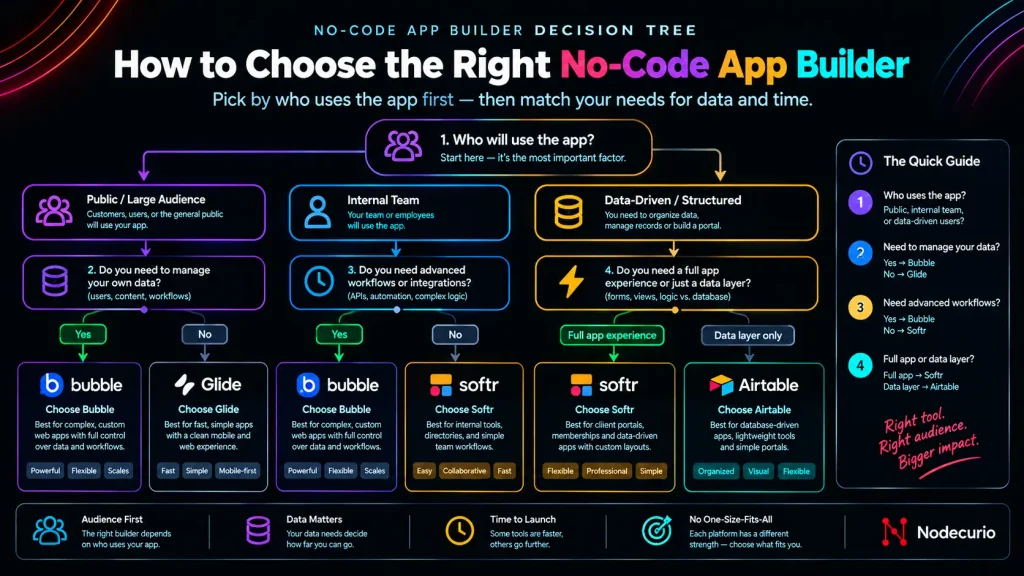
Answer these four questions in order:
- Who will use it? Only your team → Glide, Softr or Airtable. Clients or partners → Softr. The public or paying customers → Bubble.
- Where does your data live now? Google Sheets → Glide. Airtable → Airtable Interfaces or Softr. Nowhere yet → Bubble or Softr’s built-in database.
- How many people will log in? Count users before you pick. Per-user pricing (Glide Business, Softr, Airtable) is cheap at 10 users and expensive at 500. Bubble’s usage-based pricing works the other way round.
- How much time can you invest? Hours → Glide or Softr. Weeks → Bubble.
Our recommendation for most non-developers: start with Softr for anything with logins and Glide for anything built around a spreadsheet. Move to Bubble only when you are building a product that needs custom logic and its own database.
Connecting your app to the rest of your tools
No-code apps rarely work alone. Sending a Slack alert when a form is submitted, adding new users to your email list or syncing orders to a spreadsheet usually needs an automation platform alongside your app builder. If you are choosing one, see our comparison of Zapier, Make and n8n.
Budget for it, too: automation platforms bill per step or per run, and a busy app can trigger thousands of runs a month. Our breakdown of what automation actually costs per run shows how to estimate that before it surprises you.
Frequently asked questions
What is the best no-code app builders for beginners?
Glide and Softr are the easiest for beginners. Both can produce a working app in a few hours. Choose Glide if your data is in a spreadsheet and the app is for your team; choose Softr if clients or partners need to log in.
Can I build a real SaaS product without code?
Yes. Bubble is the no-code builder most suited to SaaS products, with user accounts, payments, a custom database and complex logic. Expect several weeks of learning before your first production-ready version.
Which no-code app builder is cheapest?
For small internal tools, Glide Explorer and Softr Basic both start at $19 a month on annual billing. For apps with many users, Bubble is often cheapest because it charges for server usage rather than per user. The cheapest option depends on how many people will log in.
Can I build a mobile app with no code?
Yes. Bubble can publish native iOS and Android apps on its mobile plans. Glide and Softr build web apps that work well on phones and can be added to the home screen, but they are not native App Store apps.
Is Airtable a no-code app builder?
Partly. Airtable is a database with an app layer called Interface Designer, included on every plan. It works well for internal apps on top of Airtable data, but it is not designed for customer-facing apps without the paid Portals add-on.
Do I need Airtable to use Softr or Glide?
No. Softr has its own built-in database and Glide has Glide Tables. Both can also connect to Google Sheets, and Softr can connect to Airtable. Airtable is optional.
Can I export my code from a no-code app builder?
Not from Bubble, Glide, Softr or Airtable. Your app stays on the platform. You can usually export your data, but moving to another tool means rebuilding the app itself.
How much does Bubble really cost?
Bubble’s live web plans start at $29 a month (Starter, billed annually) with 175,000 workload units. Real costs rise with usage: a busy app may need extra workload or the $119 Growth plan. Add plugins and third-party services such as payments and email on top.
Which no-code tool is best for a client portal?
Softr. It separates team users from client users, includes permissions so each client sees only their own data, and Pro includes 50 client users with extra users at $1 each per month.
Methodology and verification
Plans, prices and limits in this article were taken from each vendor’s pricing page and help documentation in September 2026. Cost scenarios are calculations based on those published prices under the stated assumptions; they exclude taxes, plugins, payment processing and other third-party services. Bubble’s overage rate is reported rather than listed on its main pricing table, so we have described it as approximate.
No-code vendors change plans often – Glide, Softr and Airtable have all restructured pricing in the last two years – so confirm current figures before you commit to an annual plan. Our fact-checking policy explains how we verify and date claims, and our editorial policy covers our independence.
Primary sources: Bubble pricing · Glide pricing · Softr pricing and plans · Airtable pricing.
Last verified: September 2026. Spotted a price that’s changed? Tell us and we’ll update it.
2 thoughts on “Best No-Code App Builders for Non-Developers in 2026: Bubble vs Glide vs Softr vs Airtable”